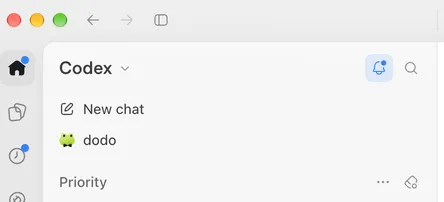
How I run OpenAI Dot in Europe on macOS
OpenAI recently released their entry in the AI bot game, the Dot. Dot is similar to Grok Bot or Meta Muse. An agent that runs on it’s own cloud virtual machine, is always available and able to perform all kinds of work on the background. Unfortunately, like some AI tech, Dot is not yet available in Europe.
The solution to get a peek into the future on the old continent is to use a VPN that takes you into some place where Dot is already available. However I did not want to run all my traffic all the time via VPN, so I came up with another solution.
The solution is quite simple and Codex will whip together the setup in no time. Main components are
- A virtual machine that hosts the ProtonVPN client (or other similar solution) and a small HTTP proxy server
- Proxy pac configuration file that sends OpenAI related traffic from the computer to the proxy running on the virtual machine.
graph TB
    subgraph MAC["Mac"]
        APP["ChatGPT / Codex app"]
        BROWSER["Browser"]
        PAC["proxy.pac<br>(macOS proxy settings)"]
        subgraph VM["Lima VM (Ubuntu)"]
            PROXY["HTTP proxy<br>127.0.0.1:port"]
            WG["WireGuard<br>(Proton VPN profile)"]
        end
    end

    APP --> PAC
    BROWSER --> PAC
    PAC -->|OpenAI domains| PROXY
    PROXY --> WG
    WG -->|VPN tunnel| PVPN["Proton VPN server<br>(US)"]
    PVPN --> OPENAI["OpenAI<br>chatgpt.com, openai.com, ..."]
    PAC -->|everything else| NET["🌐 Internet"]
    PAC -.->|fallback if VM is down| OPENAI
Disclaimer: I did not study if this breaking some terms and conditions. Do your own research, use only for testing etc.
Virtual machine
I won’t give you detailed configs for the virtual machine. Just some high level guidelines. Codex will easily figure out the details.
Create a reproducible Lima Ubuntu VM on my Mac that provides a localhost HTTP/HTTPS proxy through Proton VPN using my own WireGuard profile. Choose an unused local port and keep the proxy address stable across VM restarts.
Prefer VPN routing, but fall back to direct internet when VPN DNS or HTTPS checks fail. Retry automatically, restart WireGuard after sustained failure with a cooldown, and restore VPN routing when healthy.
Keep credentials private, disable host folder mounts, restrict the proxy to localhost, and preserve TLS without interception. Provide provisioning scripts, lifecycle commands, and a PAC example for selected domains. Don’t change my Mac’s proxy settings automatically.
Test actual proxy traffic, VPN failure, rate-limited restarts, and recovery. Document setup and usage.
As input I gave the WireGuard config you can create on the ProtonVPN website (you probably need a paid version for that). When creating this, choose a location in the US.
Note: This configuration is not designed for privacy. There’s an instruction to fall back on direct connection if the VPN is not available. If you would aim for privacy, it should work so that traffic can only go out via the VPN tunnel.
Proxy.pac
proxy.pac files are decades old technology that allows you to route browser traffic on client to either various proxy servers or directly to Internet. Typically this configuration comes from the network, but you can also configure it locally on macOS.
A small issue is that macOS does not allow you to use a file:// url for the pac, but there’s a nice workaround. Instead of putting a regular URL to the proxy URL field in macOS network settings, you can use a data:application url with the file contents Base64 encoded.
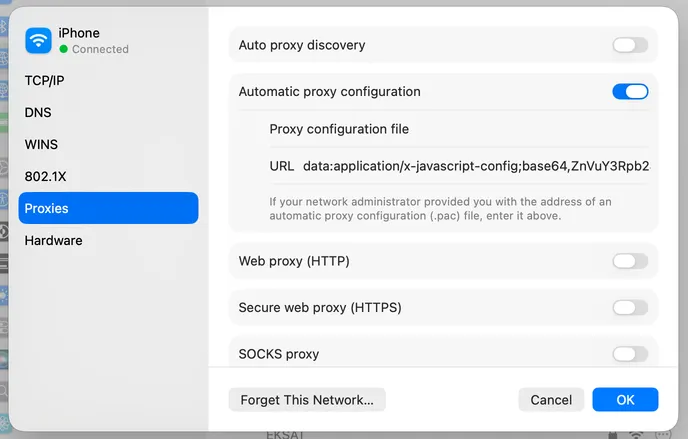
To make converting the script easier, I added a tool for base64 encoding the proxy.pac to my utility collection.
The proxy.pac you want to have looks like this. This picks traffic towards certain OpenAI related domains and sends it to the local proxy. Note that this will fall back to direct connection if the proxy is not available. I prefer this so that the ChatGPT/Codex keeps on working even if I have troubles with the virtual machine.
You need to update the proxy.pac sample below with the port Codex chooses for the virtual machine.
function FindProxyForURL(url, host) {
    host = host.toLowerCase();
    var domains = ["chatgpt.com", "openai.com", "oaistatic.com", "oaiusercontent.com"];
    for (var i = 0; i < domains.length; i++) {
        if (host === domains[i] || dnsDomainIs(host, "." + domains[i])) {
            return "PROXY 127.0.0.1:3128; DIRECT";
        }
    }
    return "DIRECT";
}
Conclusion
The configuration seems to work perfectly. I don’t need to run VPN for the whole operating system and ChatGPT gives me access to my dodo-dot agent. ChatGPT typically reacts immediately to the IP address change and either displays the agent or hides it.
Hopefully dot soon becomes available in EU as well and this hack becomes unncessary. Also this limits the usability a bit since it won’t give you dot on the mobile app.